
Think you need a full field service platform the day you hire your first helper? You don’t. A solo plumber or a two-van shop needs a lighter kind of plumbing software than a 15-truck outfit.
This guide is for owners running one to five trucks. It covers what to buy first, what to skip, and how to avoid paying for features you’ll never open.
The Myth That Small Shops Need Enterprise Plumbing Software
Most vendors build for the 20-tech shop and sell down. You end up paying for dispatch boards, fleet tracking, and multi-branch reporting you will never touch.
Picture a two-van shop booking six calls a day. The owner takes the phone, the helper runs the second truck. A drag-and-drop dispatch board adds nothing there. A shared calendar with job notes does the same work.
Your real bottlenecks are smaller. A missed call after hours is a lost drain job. An invoice sent three days late is cash you wait on. A quote written on a napkin gets disputed later.
Start with the pain. If you lose jobs to missed calls, buy call capture and texting. If you chase payments, buy invoicing with card on file. Everything else can wait a year.
For general background on dispatch-heavy platforms, see our guide to plumbing contractor software. This article stays on the lean end of the market.
What Your First Year of Plumbing Software Should Cover
Keep the first stack to four jobs: schedule, quote, invoice, and get paid. That’s it.
Schedule means one calendar both trucks can see, synced to phones. Quote means a price list you build once and reuse, so a water heater swap takes two minutes to price, not twenty. Invoice means a document sent from the driveway before you start the truck. Get paid means a card reader or text-to-pay link.
Here’s a typical call. A homeowner reports a leaking supply line under the kitchen sink. You arrive, confirm a failed compression fitting, and select a flat-rate repair from your price book. The customer approves on a phone screen. You fix it, tap pay, and leave. The whole visit closes out in one sitting, with no paperwork at the kitchen table or in the cab.
Track two numbers from day one: days from job complete to payment, and first-time fix rate. If you can’t see them, the software isn’t earning its slot.
Skip these in year one: GPS fleet tracking, marketing automation, and inventory by bin location. Add them when a real problem asks for them.
Solo Plan or Crew Plan: Which One Fits You
Most tools split into per-user pricing tiers. Picking the wrong tier is the most common expensive mistake for small shops.
Solo Plan
A solo plan covers one user with scheduling, invoicing, and payments. It suits an owner-operator who answers their own phone and drives one truck.
The trade-off is that you lose shared calendars and tech permissions. The day you hire a helper, you outgrow it. Check the upgrade path before signing, because some vendors lock you into annual terms.
Crew Plan
A crew plan adds multiple logins, a shared schedule, and role-based access. Your helper sees their jobs, not your margins.
It costs more per month, but it fixes the real hire-day headache. Without it, you text addresses and forget who is where. With it, the second tech opens the app and sees tomorrow’s route.
If you plan to add a tech within twelve months, start on the crew tier. Migrating customer history mid-season is painful, and it usually happens in your busiest month.
Six Tools Worth Pricing for Small Plumbing Shops
Here is a quick-picks list for lean operations. Prices change often, so confirm current plans with each vendor before you commit.
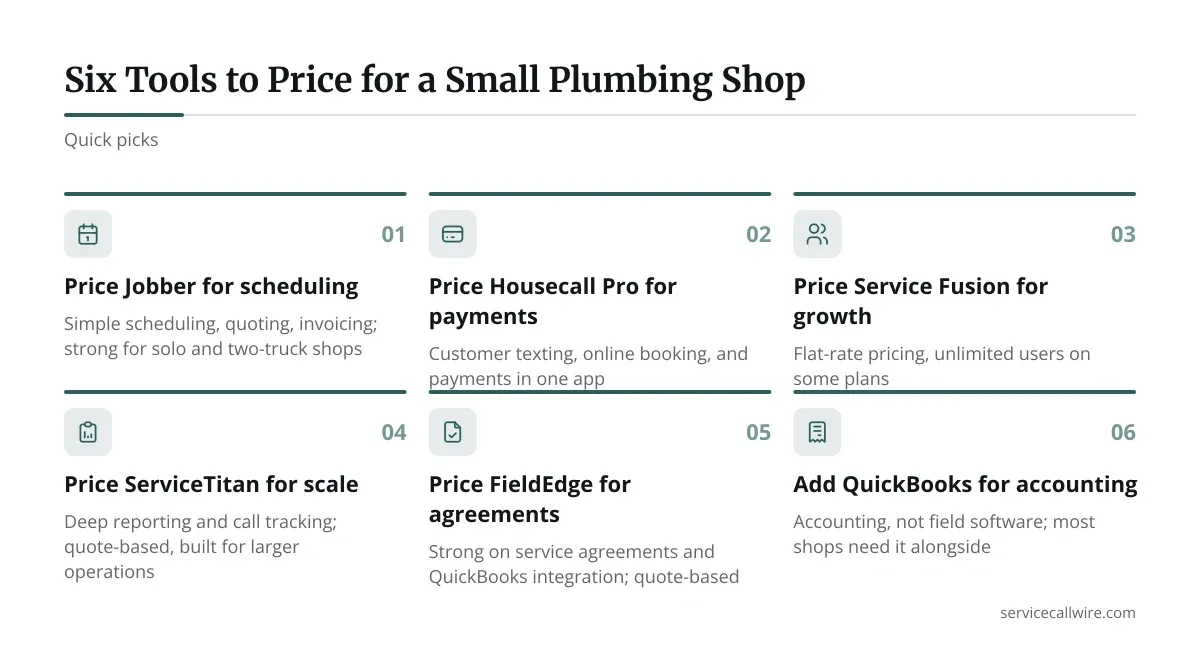
- Jobber: simple scheduling, quoting, and invoicing with tiered plans by user count. Strong for solo and two-truck shops.
- Housecall Pro: customer texting, online booking, and payments in one app. Tiered plans scale with crew size.
- Service Fusion: flat-rate pricing with unlimited users on some plans. Fits shops adding techs quickly.
- ServiceTitan: deep reporting and call tracking. Quote-based pricing, and built for larger operations.
- FieldEdge: strong on service agreements and QuickBooks integration. Quote-based.
- QuickBooks: accounting, not field software. Most shops above need it alongside.
For a one- to three-truck shop, the first three are the realistic starting points. The last two add cost and setup time you likely don’t need yet.
How These Tools Compare on What Small Shops Use Daily
| Tool | Best fit | Pricing model | Standout feature | Watch out for |
|---|---|---|---|---|
| Jobber | 1-3 trucks | Tiered by users | Clean quoting | Add-ons cost extra |
| Housecall Pro | 1-5 trucks | Tiered by users | Customer texting | Features gated by plan |
| Service Fusion | 3-10 trucks | Flat, unlimited users | Per-seat savings | Steeper learning curve |
| ServiceTitan | 10+ trucks | Quote-based | Reporting depth | Long onboarding |
| FieldEdge | 5-20 trucks | Quote-based | Agreements, QuickBooks sync | Sales-led pricing |
Ask every vendor for an all-in monthly number: software, payment processing fees, and any per-user charges. The sticker price rarely matches the invoice. Payment processing alone, typically a percentage of each card payment, can outweigh the subscription on a busy month.
Request a trial with your own price book loaded. A demo built on sample data tells you nothing about how your 40 most common repairs will price out.
Setting It Up in a Week Without Shutting the Truck Down
A rollout fails when you try to do everything at once. Do it in four short passes instead.

First, load your top 30 jobs into the price book: drain clearing, water heater swaps, fixture installs, leak repairs. Price them from your own invoices, not vendor defaults.
Second, import your customer list from a spreadsheet or QuickBooks. Clean duplicates before you import, or you’ll carry them forever.
Third, run one week in parallel. Create real jobs in the software but keep your old method as backup. Fix mismatches without losing a call.
Fourth, train the helper on one screen: job details, notes, and payment. Skip everything else. A tech who knows three taps beats one who half-knows twenty.
Start on a Monday, not before a holiday weekend. Emergency calls spike when you’re least able to troubleshoot an app.
When to Move Up to a Bigger Platform
Upgrade on evidence, not ambition. Three signals matter.
You’re double-booking. If two techs show up at the same address, your calendar has failed. You’re guessing at margins. If you can’t tell which job type pays best, you need job costing. You’re losing repeat revenue. If maintenance customers drift away unreminded, you need service agreements.
When two of those hit, price a bigger platform. Until then, a lean tool keeps your monthly cost low and your attention on the work.
Expect migration to take a few weeks, not days. Export your customer and job history before you cancel anything, and confirm you can download it in a usable format.
Closing Thoughts on Plumbing Software at Your Size
Good plumbing software for a small shop is boring on purpose. It books the call, prices the job, sends the invoice, and collects the money.
Buy for the problem you have this quarter. Test with your own price book, get an all-in monthly figure, and plan the upgrade before you need it.
Revisit your setup once a year. If the tool still solves a problem you can name, keep it. If it only adds screens, cut it.
Frequently asked questions
Can a solo plumber get by with free tools instead of paid plumbing software?
Yes, for a while. A shared calendar, a spreadsheet price book, and a free invoicing app handle a few jobs a week. The cracks show when you need card payments, customer texting, or a helper on the schedule. At that point a paid plan saves more time than it costs.
How long does it take a two-truck shop to switch software?
Plan on about a week for setup and a second week running in parallel. Loading your price book and cleaning customer data takes the most time. Rushing the import is what causes problems later.
Should I pay for payment processing inside the software or use my own card reader?
Compare the all-in rates. Built-in processing is convenient and syncs payments to invoices automatically. A separate reader may charge less but forces manual reconciliation. Ask each vendor for their per-transaction rate in writing.
What’s the first sign my small shop has outgrown a basic plan?
Double-bookings. When two techs head to the same address, or you can’t tell who is free for an emergency call, your scheduling tool has hit its limit. That’s your cue to look at a crew-tier or larger platform.
Do I need QuickBooks if my plumbing software already sends invoices?
Usually yes for the books. Field tools handle jobs and invoices, but accounting still needs a ledger for taxes, payroll, and reports. Most platforms sync with QuickBooks, so check that integration before you buy.
