Most small contractors don’t need a bigger system. They need fewer moving parts. The industry pushes enterprise tools on a five-truck shop, and the owner pays for features nobody opens. Mobile workforce management for a crew under 15 techs is a different job than it is for a 200-tech fleet.
You run lean. One dispatcher, maybe the owner doubling as one, and a handful of techs who need clear answers on their phones. This guide covers what a small crew should set up, what to skip, and where the real money leaks.
Why Small Crews Break Differently Than Big Ones
A large fleet fails on volume. A small crew fails on dependence. When your lead tech calls in sick on a 98-degree July morning, one missing person reshuffles the whole day.

Picture a six-truck HVAC shop with two no-cool calls booked before 9 a.m. Tech three is out. The dispatcher texts four people, checks a whiteboard, and promises a window she can’t verify. The customer waits, and your response time slips from two hours to five.
That is the real problem to solve. Big-fleet features like route optimization across 60 vehicles don’t help you here. A shared calendar everyone trusts does. Your system needs to answer three questions instantly: who is available, who is closest, and who is qualified for this call.
If you want the full feature breakdown, our buyer’s guide to mobile workforce management software covers the general category. This article stays on the small-crew decisions.
The Minimum Mobile Workforce Management Setup That Works
Skip the 40-item feature wish list. A small shop runs well on five capabilities:
- A live schedule techs can see on their phones
- Customer history attached to each address
- Photo capture on every job
- A job status the office can see without calling
- Invoicing that closes the ticket on site
Everything else is optional until you hit about 10 techs. Notice what is missing: advanced analytics dashboards, custom workflow builders, and multi-branch reporting. Those sell well in demos and sit unused in a small shop.
Test any tool with one rule. If your newest tech can’t complete a service call on it after a 20-minute walkthrough, it’s too complicated for your crew. Small shops can’t afford a two-week training curve during peak season.
Mobile Workforce Management Cost Per Tech: What Small Shops Really Pay
Pricing in this category is mostly per user, per month, so headcount drives your bill. Most platforms charge a monthly fee per technician, often with a higher tier that opens up dispatch boards, quoting, or accounting sync. Vendor pricing changes often, so confirm the current tier on each vendor’s site before you commit.
Run the math on your own shop. A crew of eight techs on a per-user plan, plus two office seats, means ten paid users. If you only need the office to dispatch, ask whether those seats can be cheaper.
Watch for the hidden costs:
- Onboarding or data-import fees when you migrate customer records
- Payment processing percentages on card transactions
- Add-on charges for text messaging or GPS
- Annual contracts that lock you in before you test
A tool that saves one missed callback a week often covers its own cost. A callback is a truck roll with no revenue attached, so count that against the price. If the tool doesn’t cut callbacks or admin hours, it is overhead.
Comparing Three Mobile Workforce Management Approaches
You have three realistic paths. Each fits a different kind of shop.
The Simple Field Service App
Tools like Jobber and Housecall Pro target small crews. They bundle scheduling, invoicing, and customer messaging with a short learning curve. The tradeoff is depth. As you add techs and service agreements, you may hit limits on dispatch logic and reporting.
The HVAC-Specific Platform
ServiceTitan and similar contractor-focused systems offer deep pricebooks, membership tracking, and call-booking reports. They also demand real setup time and a bigger budget. A shop under 10 techs often pays for capacity it won’t use for a year or two.
The Spreadsheet and Shared Calendar Stack
Some owners run Google Calendar, a texting thread, and QuickBooks. It costs almost nothing and works until about four techs. Then double-bookings and lost notes start costing real jobs. Treat it as a starting point, not a plan.
Rolling Out Mobile Workforce Management Without Wrecking Your Busy Season
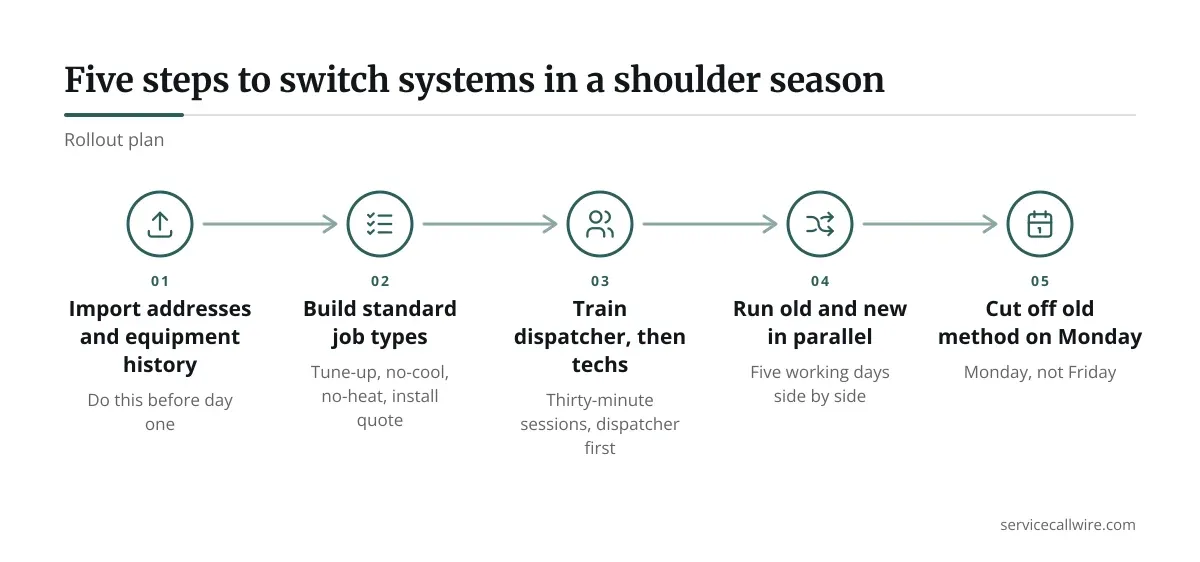
Don’t switch in July. Pick a shoulder season, which for most HVAC shops means April or October, and run the new system alongside the old one for one week.
Start with your two most reliable techs. Let them run every call on the new app first. They will find the awkward spots in a few days, and the rest of the crew inherits a cleaner setup.
Here is a rollout that fits a small shop:
- Import customer addresses and equipment history before day one.
- Build your standard job types: tune-up, no-cool, no-heat, install quote.
- Train the dispatcher first, then the techs, in 30-minute sessions.
- Run old and new in parallel for five working days.
- Cut the old method off on a Monday, not a Friday.
Expect one tech to resist. Usually it’s your most experienced one, who has run jobs off a clipboard for 20 years. Show him the payoff: no end-of-day paperwork, and customer history in his pocket on the next visit.
Measuring Whether Mobile Workforce Management Is Working
Pick three numbers and check them monthly. More than that and you’ll stop looking.
First-time fix rate tells you whether techs arrive with the right information and parts. Jobs per tech per day shows whether scheduling is tight. Average time from call to dispatch shows whether the office is moving faster than before.
Write down your baseline before you switch. Without it, you can’t tell whether the software helped or just felt busy. If those three numbers don’t improve within 90 days, the tool or the setup needs another look.
Compare notes with a broader view too. Our guide to mobile workforce management solutions for field service teams frames the larger picture if you outgrow the small-crew stage.
Run Lean, Then Grow Into More
Small crews win by staying simple. Choose the lightest tool that gives your dispatcher a trustworthy schedule and your techs a clean phone screen. Add depth only when a real bottleneck demands it.
The cost of overbuying is quiet but steady. You pay monthly for features that never touch a job. The cost of underbuying shows up as missed windows and callbacks, which customers remember.
Start small, measure three numbers, and revisit the decision at 10 techs. That is mobile workforce management scaled to the shop you actually run.
Frequently asked questions
At what crew size should an HVAC shop move off spreadsheets?
Most shops feel the strain around four techs. Double-bookings, lost job notes, and slow invoicing start costing more than a basic app would. If your dispatcher spends over an hour a day reconciling schedules, you have already waited too long.
Do small crews need GPS tracking?
Not always. GPS helps most when you dispatch to the nearest tech and need arrival times for customers. If your techs work set territories with scheduled windows, you can add tracking later without losing much.
How long does setup take for a five-truck shop?
Plan for one to two weeks including data import and parallel running. The customer record import usually takes the longest. A clean address list and equipment notes speed everything up.
Should the owner or the dispatcher choose the software?
Both should, but the dispatcher gets the final say on daily usability. She lives in the schedule board all day. The owner should weigh cost and reporting.
What is the biggest mistake small shops make when switching?
Switching in peak season. A tool that feels fine in April can crush a crew in July if nobody has practiced on it. Pilot with two techs first, then roll out in a slow month.