
Think you need a full-time dispatcher before HVAC dispatch software can help? Most owner-operators with five to fifteen trucks never hire one. They run the board from a phone between calls.
This guide is for that shop. You’ll see how to dispatch around HVAC-specific problems like no-cool calls, maintenance agreements, and equipment history. For the general platform overview, start with the buyer’s guide for service managers.
The Owner-Dispatcher Problem
Picture a 95-degree Tuesday. Your phone rings during a compressor swap. Two techs wait on callbacks. A no-cool call from a daycare sits unassigned.

That is the real cost of manual dispatch. You are the bottleneck, and every minute you spend on the phone is a minute your lead tech spends idle.
Software removes you from the loop for routine decisions. Techs see their own queue and accept jobs from their phones. Customers get automated confirmations without you typing a word.
The goal is not full automation. It is to stop being the only person who knows where every truck is.
What HVAC Dispatch Software Needs That Generic Tools Skip
General field service tools handle appointments. HVAC adds layers that break generic setups.
You need equipment records attached to each address: model, serial number, install date, refrigerant type. A tech arriving at a ten-year-old R-410A condenser should see that history before knocking.
You need maintenance agreement tracking. Spring tune-ups and fall furnace checks are your recurring revenue. Software should generate those visits automatically and flag overdue ones.
You also need job-type logic. A no-heat call in January is not a quote visit. Your board should treat them differently by skill, truck stock, and urgency.
If a tool can’t store equipment history per site, cross it off. Retrofitting that later costs more than choosing right now.
Triage Rules for Emergency Calls
Dispatch software only helps if your triage is written down first. Most small shops carry it in the owner’s head.
Write three tiers on one page:
- Tier 1: No heat below freezing, no cooling for vulnerable occupants, gas smell or CO alarm. Same-hour response.
- Tier 2: System down, no safety risk. Same-day.
- Tier 3: Noise, weak airflow, thermostat quirks. Next available slot.
Load these as job priorities in your software. Then a dispatcher, or a part-time answering service, can assign without calling you.
A Phoenix-style summer example: your tier 1 list includes any call from a daycare, clinic, or senior home. The system pushes those to the nearest qualified tech and bumps a tier 3 tune-up by two hours. Nobody had to ask you.
Choosing HVAC Dispatch Software at Your Size
Roundups often stack twenty tools. For a small HVAC shop, three or four fit. Here is an honest read, with pricing models rather than quoted figures since vendors change plans often.
| Platform | Strength for HVAC | Pricing model | Watch for |
|---|---|---|---|
| Housecall Pro | Fast setup, solid mobile app, agreement tools | Tiered per-plan monthly fee | Advanced reporting sits in higher tiers |
| Jobber | Clean scheduling, easy quoting | Tiered monthly plans | Lighter equipment-history depth |
| ServiceTitan | Deep HVAC workflow, pricebook, reporting | Quote-based, onboarding fee | Built for larger shops; heavy for five trucks |
| FieldEdge | Strong agreement and equipment handling | Quote-based | Longer implementation |
Verify current pricing directly with each vendor before you commit. The tier a shop needs usually decides the real cost, not the entry plan.
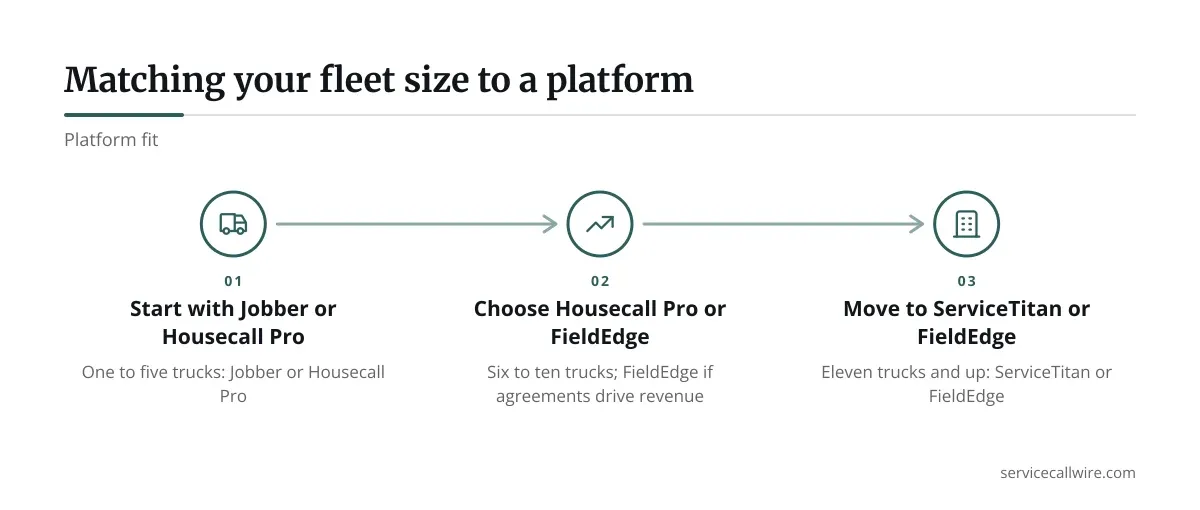
Under eight trucks, start with Housecall Pro or Jobber. At ten or more, with agreements as a major revenue line, demo FieldEdge and ServiceTitan.
Quick picks by shop size
- One to five trucks: Jobber or Housecall Pro.
- Six to ten trucks: Housecall Pro, or FieldEdge if agreements drive revenue.
- Eleven trucks and up: ServiceTitan or FieldEdge.
HVAC Dispatch Software Setup Checklist for Your First 30 Days
Most failed rollouts skip the boring prep. Do this before day one.
- Import customers and equipment from your old spreadsheet or QuickBooks export.
- Build your job types: tune-up, no-cool, no-heat, install quote, warranty callback.
- Set tech skills so refrigerant-certified techs get the right calls.
- Load your tier 1, 2, and 3 priority rules.
- Create one recurring agreement template and test it on three customers.
- Run the old and new systems side by side for one week.
Block half a day for the import alone. Dirty customer data is the top reason boards look wrong in week one.
Assign one tech as the pilot. Let that person find the bugs before the whole crew does.
Measuring Whether Your HVAC Dispatch Software Works
Software that does not move numbers is an expense. Pick three and track them from week one.
Response time on tier 1 calls. Measure from call received to tech en route. If it falls under an hour consistently, your triage rules are working.
First-time fix rate. Equipment history and truck stock visibility should lift this. Track callbacks within 14 days as the inverse.
Jobs per tech per day. Better routing and fewer idle gaps should add one job on a typical day. At an average ticket of a few hundred dollars, that adds up fast over a season.
Review these monthly with your lead tech. If a number is flat after sixty days, the problem is usually setup, not the software. For routing and costing mechanics, see the broader breakdown of dispatch platforms.
Putting the Board to Work
Small shops win by removing yourself from routine decisions. Write your triage tiers, pick a platform sized to your fleet, and clean your data before launch. Then measure three numbers monthly.
You do not need ServiceTitan money to get ServiceTitan discipline. A well-configured mid-tier tool beats an expensive one nobody trusts.
Start with a two-week trial of your top pick. Run it on real calls, not demo data. If your techs prefer it and tier 1 response time drops, you have your answer. For a wider look at comparing options, the field service dispatch software guide covers evaluation criteria in depth.
Frequently asked questions
Do I need a dispatcher to benefit from HVAC dispatch software?
No. Software lets techs self-assign from a shared queue, and you review the board between calls. Many five-truck shops run this way for a full season before hiring anyone.
Can dispatch software handle maintenance agreement visits automatically?
Yes, on most HVAC-capable platforms. You set a recurring template, and the system generates spring and fall visits. Confirm the tool flags overdue agreements before you buy.
How long does setup take for a ten-truck shop?
Plan on two to four weeks, including data import and a pilot tech. Rushing it usually produces a messy board and a crew that distrusts the tool.
Should I choose ServiceTitan right away if I plan to grow?
Not necessarily. It is built for larger operations and can overwhelm a small shop. Starting on a lighter tool and migrating later often costs less than overbuying now.
What data should I clean before importing customers?
Fix duplicate accounts, standardize addresses, and attach equipment details where you have them. Clean data on day one prevents most early scheduling errors.
